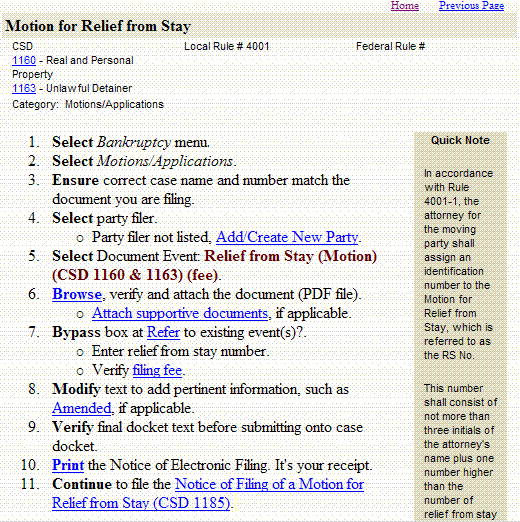
The procedure "Motion for Relief from Stay," shown on the right, is a sample of the procedures that will appear in the manual. The procedure features, beginning at the top, are outlined below.
Court forms - If there are court forms (CSD) related to a specific procedure, their hyperlinked number will appear immediately below the procedure title. (ie CSD 1160) Click on the hyperlink to access the form, which is in a fillable pdf format.
Local Rule/Federal Rule - Any associated Local Rule or Federal Rule number are displayed in this area.
Category - Directly under the forms listing, the category in which this document is filed under is displayed. (ie Category: Motions/Applications)
Procedure Steps - The procedure's step-by-step directions appear directly below the Category listing. Each numbered step represents a CM/ECF screen or option.
Hyperlinked Text - Hyperlinked text within the procedure provide additional detailed information for completing a particular step. The hyperlink will either popup within the procedure or take you to another web page or procedure.
Quick Note - Sidebars titled Quick Note appear in the shaded area alongside the procedure. They provide more information to help you file more accurately.